

Open Beta · Access by Request · Free While in Beta
The hosting control panel, reimagined
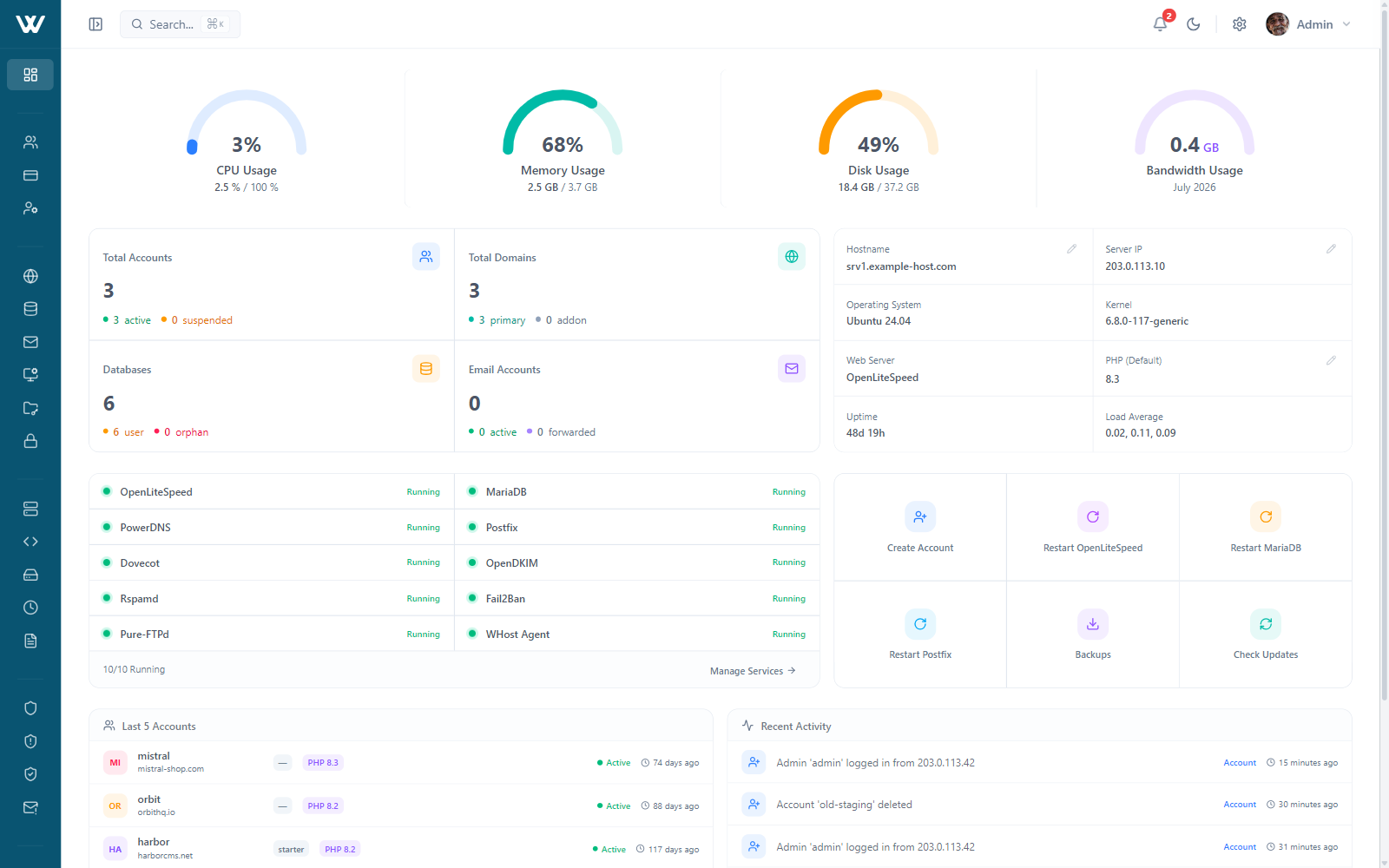
WHost is a complete, modern hosting panel: accounts, mail, DNS, databases and SSL in one place, with first-class Python and Node app hosting, kernel-level isolation and an API for everything. Built from the ground up by the team behind WISECP.
One Panel
Every hosting essential, built in
Accounts, domains, mail, DNS, databases, SSL, files and backups all live in one modern UI, with the fiddly parts already wired up: DKIM and ARC signing, one-click DNSSEC, phpMyAdmin single sign-on and a Monaco-powered file manager.
Accounts & Plans
Provision, suspend and repackage accounts, each in its own kernel-limited slice.
Domains
Addon domains, subdomains, parked domains and redirects, checked before they save.
Mailboxes with DKIM and ARC signing, Rspamd filtering and one-click webmail.
DNS
PowerDNS zones with one-click DNSSEC and BIND import and export.
Databases
MariaDB databases and users with granular privileges and phpMyAdmin single sign-on.
SSL
Let's Encrypt with bulk issuance, wildcards, custom certs and HSTS.
File Manager
The Monaco editor in the browser, with archives, uploads and live previews.
Backups
Scheduled backups to six remote targets, with selective, name-checked restores.
Cron Jobs
Scheduled tasks with a built-in cheatsheet and a guard on risky commands.
FTP Accounts
Per-account FTP users with chroot, over a hardened Pure-FTPd.
Resellers & ACLs
Reseller hierarchies with permission templates; denied features simply disappear.
Logs & Audit
Access, error and PHP logs tailing live, plus a full audit trail.
App Hosting
Run full apps, not just PHP
Most panels stop at PHP. WHost also runs Python and Node apps: upload a Django, Flask, FastAPI, Express or Next.js project and the panel detects the framework, installs its dependencies and starts it, streaming the whole deploy live. No terminal, no manual setup.
Each app runs as its own isolated service with its own dependencies. Python 3.10-3.13 with Gunicorn or Uvicorn, Node 18 / 20 / 22 with native cluster mode.
Security
Locked down by default
Isolation, a live firewall, a WAF and signed updates come switched on, not sold as extras. WHost defends every account and patches itself safely, so security is the default, not a project.
Every Account Walled Off
Each account is its own Linux user in its own cgroup v2 slice, with CPU, memory, IO and process limits from the kernel. A break-in stays boxed in.
Under-Attack Mode
One switch hardens the kernel, firewall, rate limits and Fail2ban together. A weighted threat score arms it automatically past 5 of 10.
WAF and Fail2ban, On by Default
ModSecurity v3 with the OWASP Core Rule Set filters requests, with a per-account toggle, while Fail2ban jails cover SSH, web and mail.
Signed Updates That Roll Back
Releases are RSA-signed and SHA-256 verified, applied atomically with a health check that undoes itself on failure. Patch the day a fix lands.
2FA and IP Allowlists
TOTP or email codes with ten single-use backup codes, an admin IP allowlist, and a live session list you can revoke at any time.
Hardened by Design
An HMAC-signed API with replay defense, path-traversal and SSRF rejected at every boundary, the agent bound to loopback, and regular red-team review.
Webserver Engine
Webserver Freedom
Five engines, one panel, switch anytime
Nginx, Apache, both together, OpenLiteSpeed or LiteSpeed Enterprise. Change the engine under a live account and WHost rebuilds the vhosts on the new one, so your first choice is never final.
Modern Interface
Modern software, through and through
Built on a current React stack, with dark and light themes, a command palette and live charts. Every screen is fast, keyboard-friendly and easy on the eyes, so the everyday work just flows.
Press ⌘K anywhere to jump to a page or run an action.
Performance
Light on the server, quick in the browser
The panel ships as a static build served straight from Nginx, with no Node runtime to feed, and kernel-level limits keep one busy account from slowing the rest.
A Panel That Barely Costs
The frontend is static files, not a running app, so there is no panel process competing with your sites. Behind it sits one lightweight Python agent on loopback.
Static frontend · loopback agent · no Node runtime
Fair Share, by the Kernel
cgroup v2 caps every account's CPU, memory, IO and process count, read live from the kernel, so a spike on one site can't steal the whole box.
cgroup v2 limits, live from the kernel
Quick in the Browser
Cached queries make panel navigation feel instant, and the LiteSpeed engines add HTTP/3 and LSCache for the sites you serve.
HTTP/3 · LSCache · cached navigation
Built for Developers
If the UI can do it, the API can do it
Every panel operation is a documented REST call: HMAC-signed, replay-safe and idempotent, with OpenAPI 3.1, Swagger UI and ReDoc built in. Open to any billing stack that speaks HMAC; a ready-made WISECP module is on the roadmap.
# Sign the call: method, path, timestamp, nonce and body bound together
SIG=$(printf 'POST\n/api/v1/accounts\n%s\n%s\n%s' "$TS" "$NONCE" "$BODY" |
      openssl dgst -sha256 -hmac "$WHOST_SECRET" -r | cut -d' ' -f1)

curl -X POST https://panel.example.com/api/v1/accounts \
  -H "X-Api-Key: $WHOST_KEY" -H "X-Timestamp: $TS" \
  -H "X-Nonce: $NONCE" -H "X-Signature: $SIG" \
  -H "X-Idempotency-Key: order-1042" -d "$BODY"

# 201 Created
{ "status": "success", "data": { "username": "acme", "state": "active" } }
// composer require wisecp/whost-php-sdk
$whost = new WHost\Client($key, $secret);
$account = $whost->accounts->create([
'username' => 'acme',
'domain' => 'acme.com',
'plan' => 'cloud-25',
], idempotencyKey: 'order-1042');
// Retries, signing and the response envelope are handled for you
echo $account->state; // "active"// Same signature contract, byte-identical across PHP, JS, Go, Ruby and Bash
const payload = `POST\n/api/v1/accounts\n${ts}\n${nonce}\n${body}`;
const sig = createHmac('sha256', secret).update(payload).digest('hex');
const res = await fetch('https://panel.example.com/api/v1/accounts', {
method: 'POST',
headers: { 'X-Api-Key': key, 'X-Timestamp': ts,
'X-Nonce': nonce, 'X-Signature': sig },
body,
});Official PHP SDK
38 resources and 400+ typed methods with retries, idempotency and webhook verification. Installed with Composer.
Webhooks, Delivered
25 signed events with exponential backoff, a dead-letter queue and manual retry. No polling loops.
Docs Your AI Can Read
An llms.txt index, agent playbooks and an API summary sized to fit a context window. Point your agent at it.
Read the llms.txt indexA Stable v1 API
The v1 API only adds, it never breaks. Anything on the way out gets 15 months' notice, flagged by Sunset headers, so your integration keeps working.
Getting Started
Bring your accounts over from the panel
Start a migration in WHost and it pulls accounts, mail, DNS and databases from your old server, with live progress you can watch. It reads seven panels directly, from cPanel and Plesk to CyberPanel and HestiaCP, and takes anything else from a backup upload. Starting fresh is a single command.


- Reads cPanel, Plesk, DirectAdmin, CyberPanel, CloudPanel, HestiaCP and CWP, scanning accounts, mail, DNS and databases
- Takes any other panel from a backup archive upload
- Streams every phase live, connect, scan, select and migrate, and resumes on its own
- Verify the copy first, then cut over when you're ready
$ git clone https://wisecp.com/files/whost/whost.git \
    && cd whost/installer \
    && bash install.sh --hostname=srv1.example.com

✓ MariaDB · PowerDNS · Postfix + Dovecot · Pure-FTPd
✓ Firewall · Fail2Ban · ModSecurity with OWASP CRS
✓ phpMyAdmin · Roundcube · Rspamd · Let's Encrypt
✓ Admin credentials generated · rollback armed on failureTested on 2 vCPU and 4 GB of RAM on every supported system; 4 vCPU and 8 GB recommended for production.
Open Beta
Be among the first to run WHost
The beta is free and needs no card. Access opens in small groups: send a request, tell us what you want to test, and we will get back to you by email.